
A key aspect of evaluating your business Risks/Opportunities is determining the likely ‘Significance Rating’ of each individual issue. This is a parameter that determines the overall ‘weight’ or ‘importance’ of the issue, and/or the overall potential impact that the Issue may have should a Risk occur or Opportunity be pursued. Significance is typically measured as ‘Low’, ‘Medium’, or ‘High’, with ‘High’ Significance denoting an Issue that should be prioritised for mitigation (if it is a Risk) or realisation (if it is an Opportunity).
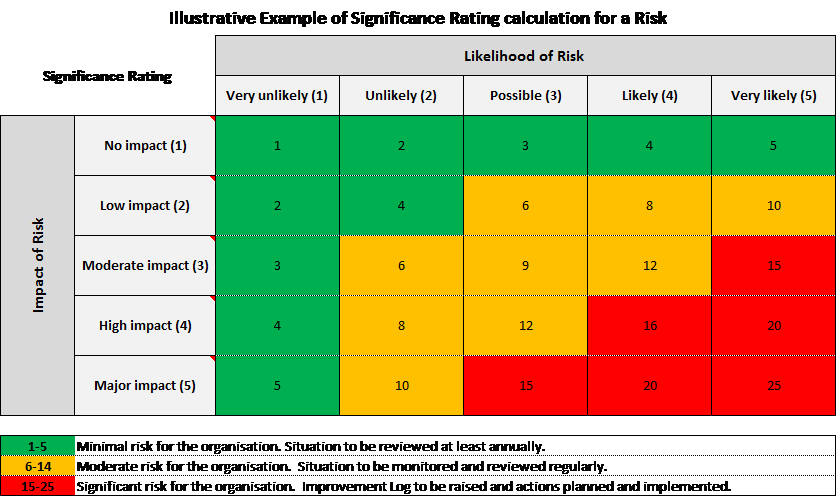
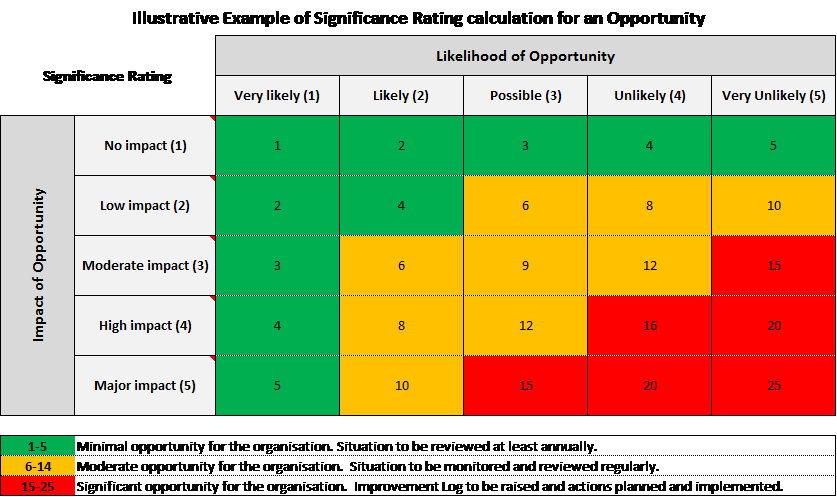
Significance itself it typically based on the Likelihood of a Risk/Opportunity occurring, and the Impact of the Issue should it occur. A higher Likelihood and Impact rating leads to a higher Significance Rating, with the lowest Significance Ratings occurring where both Likelihood and Impact are rated as No Impact/Very Unlikely, and the highest ratings occurring where Likelihood and Impact are rated as Major/Very Likely. To ensure consistent Significance Ratings, most systems will choose to create a scored scale of Likelihoods and Impacts, and then multiply these to produce a final Significance Score. As such, Significance Rating is typically calculated as:
Likelihood Score x Impact Score = Significance Score
This score is then compared to pre-defined numerical thresholds that are used to determine the final Significance Rating. For example:
- If your Thresholds state that scores equal to or below 5 are ‘Low Significance’, then any Issue with a Significance Score of 1-5 is rated Low/Minimal.
- If your Thresholds state that scores 6 to 14 are ‘Medium Significance’, then any Issue with a Significance Score of 6-15 is rated Medium/Moderate.
- If your Thresholds state that scores equal to or above 15 are ‘High Significance’, then any Issue with a Significance Score of 15+ is rated High/Significant.
This is illustrated further within the following example charts:
To ensure consistency throughout your system, and accuracy of final Significance Ratings, Activ automatically calculates all Significance Scores using the Likelihood and Impacts that you select against each Issue, then automatically compares these Scores to inbuilt Thresholds to determine the final Rating. In addition, whilst Activ comes pre-loaded with a set of defaults to allow immediate use of the module, it also provides you with the option to fully customise:
- the individual options available for selection within the Likelihood and Impact fields;
- the scores associated with each Likelihood and Impact; and
- the thresholds for each Significance Rating (i.e. the score bandings that are considered ‘Low’ Significance, ‘Medium’ Significance, and ‘High’ Significance).
For further convenience, your Likelihood and Impact fields are managed separately for Risks and Opportunities, providing you with more flexibility in how these ratings scales are arranged for each type of Issue. This enables you to create different scales for each if required. See Configure Business Risk Manager Settings for guidance on configuring your Likelihoods, Impacts, and Significance Thresholds.
